Instant 3D Props
For Your Game World
Stop wasting hours modeling crates, barrels, and furniture. Generate fill assets and environmental props from text or images in seconds. Populate your levels faster.
Powerful Control
Optimize polycounts, inspect wireframes, and export game-ready assets.
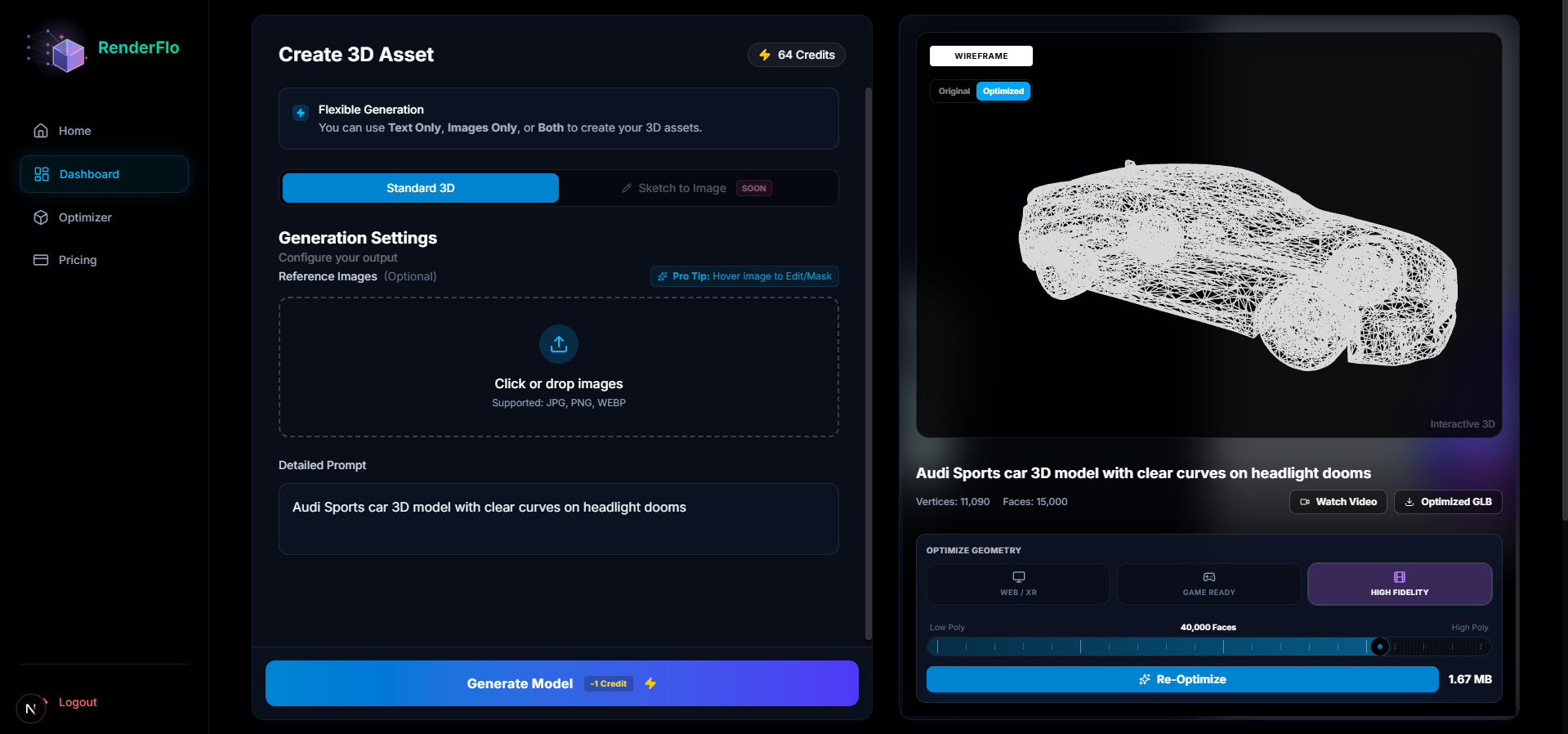
Built for World Building
Everything you need to fill your scenes with unique assets, optimized for game engines.
Rapid Prototyping
Generate dozens of variations for crates, rocks, and clutter in minutes.
Game Ready Exports
Download in .GLB or .OBJ formats, ready to drop into Unity, Unreal, or Godot.
Text & Image Input
Describe what you need or upload a sketch. AI handles the geometry.
Automated Texturing
Assets come with baked textures and basic PBR maps automatically applied.
Smart Masking
Precise control over your inputs. Mask out backgrounds or unwanted elements.
Polycount Control
Optimize for any platform. Set exact face counts for mobile or high-end PC.
Loved by Creators
Join thousands of developers building their dream games with RenderFlo.

Alex Chen
Indie Game Developer
"RenderFlo has completely changed my workflow. I used to spend days modeling basic props, now I just generate them in seconds. The Auto-UV feature is a lifesaver!"

Sarah Miller
Environment Artist
"The quality of the generated assets is surprisingly good. Perfect for filling out scenes quickly. It fits right into my Unity pipeline without any hassle."

Jordan Lee
Level Designer
"I was skeptical at first, but the 'Sketch to Image' feature blew me away. Being able to doodle a rough shape and get a 3D model back is magic."
Alex Chen
Indie Game Developer
"RenderFlo has completely changed my workflow. I used to spend days modeling basic props, now I just generate them in seconds. The Auto-UV feature is a lifesaver!"
Sarah Miller
Environment Artist
"The quality of the generated assets is surprisingly good. Perfect for filling out scenes quickly. It fits right into my Unity pipeline without any hassle."
Jordan Lee
Level Designer
"I was skeptical at first, but the 'Sketch to Image' feature blew me away. Being able to doodle a rough shape and get a 3D model back is magic."
Alex Chen
Indie Game Developer
"RenderFlo has completely changed my workflow. I used to spend days modeling basic props, now I just generate them in seconds. The Auto-UV feature is a lifesaver!"
Sarah Miller
Environment Artist
"The quality of the generated assets is surprisingly good. Perfect for filling out scenes quickly. It fits right into my Unity pipeline without any hassle."
Jordan Lee
Level Designer
"I was skeptical at first, but the 'Sketch to Image' feature blew me away. Being able to doodle a rough shape and get a 3D model back is magic."

Emily Zhang
Technical Artist
"Finally, a generative AI tool that actually respects topology! The exports are clean enough to use in production with minimal cleanup."

Michael Brown
Solo Dev
"As a solo dev, time is everything. RenderFlo gives me back hours every week. It's like having a junior 3D artist on the team 24/7."

Jessica Wilson
Art Director
"Great for rapid prototyping. We use it to block out levels before committing to high-poly assets. Highly recommended for any game studio."
Emily Zhang
Technical Artist
"Finally, a generative AI tool that actually respects topology! The exports are clean enough to use in production with minimal cleanup."
Michael Brown
Solo Dev
"As a solo dev, time is everything. RenderFlo gives me back hours every week. It's like having a junior 3D artist on the team 24/7."
Jessica Wilson
Art Director
"Great for rapid prototyping. We use it to block out levels before committing to high-poly assets. Highly recommended for any game studio."
Emily Zhang
Technical Artist
"Finally, a generative AI tool that actually respects topology! The exports are clean enough to use in production with minimal cleanup."
Michael Brown
Solo Dev
"As a solo dev, time is everything. RenderFlo gives me back hours every week. It's like having a junior 3D artist on the team 24/7."
Jessica Wilson
Art Director
"Great for rapid prototyping. We use it to block out levels before committing to high-poly assets. Highly recommended for any game studio."

David Kim
VR Developer
"The PBR maps are decent out of the box. I dropped the generated models straight into my VR project and they looked great under dynamic lighting."

Ryan O'Connor
Game Design Student
"I'm not great at 3D modeling, so this tool allows me to actually build the games I want to make. The interface is super intuitive."

Emma Davis
3D Generalist
"It's not going to replace a senior artist, but for background props and debris? It's unbeatable. The texture consistency is impressive."
David Kim
VR Developer
"The PBR maps are decent out of the box. I dropped the generated models straight into my VR project and they looked great under dynamic lighting."
Ryan O'Connor
Game Design Student
"I'm not great at 3D modeling, so this tool allows me to actually build the games I want to make. The interface is super intuitive."
Emma Davis
3D Generalist
"It's not going to replace a senior artist, but for background props and debris? It's unbeatable. The texture consistency is impressive."
David Kim
VR Developer
"The PBR maps are decent out of the box. I dropped the generated models straight into my VR project and they looked great under dynamic lighting."
Ryan O'Connor
Game Design Student
"I'm not great at 3D modeling, so this tool allows me to actually build the games I want to make. The interface is super intuitive."
Emma Davis
3D Generalist
"It's not going to replace a senior artist, but for background props and debris? It's unbeatable. The texture consistency is impressive."
How It Works
From concept to game-ready asset in four simple steps.
Upload Reference Image
Start by uploading an image to use as a base for your 3D model generation.
Apply Smart Masking
Use our masking tool on your reference image to pinpoint exactly what to generate and what to exclude.
Generate 3D Asset
Let our AI transform your masked input into high-quality 3D geometry and texture in seconds.
Export and Use
Download your production-ready GLB or OBJ file, compatible with Unity, Unreal, and Blender.